
Writing an invoice does not have to be complicated. A good invoice clearly explains who provided the product or service, who owes the money, what was delivered, how much it costs, when payment is due, and how the customer can pay.
Whether you are a freelancer sending your first client bill, a contractor charging for a completed project, or a small business invoicing customers every week, the basic process is similar. This guide explains how to write an invoice step by step, shows realistic examples, covers common mistakes, and gives you a checklist you can use before sending.
If you want to create one immediately, use the InvoiceExact free invoice generator. You can enter your details, add line items, review the totals, customize the document, and download a professional PDF without signing up.
Quick answer: To write an invoice, add your business details, the customer’s details, a unique invoice number, invoice and supply dates, a clear description of the goods or services, quantities and prices, tax or VAT when applicable, the total amount due, payment terms, and payment instructions. Then check the document and send it in a format your customer can open.
What is an invoice?
An invoice is a document that records a sale and requests payment from a customer. It describes the products or services supplied, the amount charged, and the terms for paying. An invoice can be created as a paper document, a PDF, or an electronic document, depending on the business and the customer’s requirements.
An invoice is not exactly the same as a quote or a receipt. A quote or estimate proposes a price before work begins. An invoice requests payment after a product or service has been supplied, or according to an agreed billing schedule. A receipt confirms that payment has already been received. You can create a receipt with the InvoiceExact free receipt generator.
| Document | Main purpose | Usually sent |
| Quote or estimate | Explains expected work and price before approval | Before the sale or project |
| Invoice | Requests payment for supplied goods or services | After delivery or at an agreed milestone |
| Receipt | Confirms that payment was received | After payment |
| Credit note | Corrects, reduces, or reverses an earlier invoice | After an adjustment or return |
Keeping these documents separate helps prevent confusion. A quote can become the basis for an invoice, but it is not a demand for payment unless your agreement says otherwise.
What information should an invoice include?
The exact legal requirements depend on your country, tax registration, industry, and customer. However, most professional invoices contain the same core information. GOV.UK lists a unique identification number, seller and customer details, a description of the charge, supply date, invoice date, amounts charged, VAT when applicable, and the total owed among the information an invoice must include.
For EU VAT purposes, the European Commission’s full-invoice guidance also identifies the supplier and customer, a unique sequential number, dates, descriptions and quantities, unit prices excluding tax, VAT rate, VAT amount, and a breakdown by VAT rate or exemption. These rules are not a universal substitute for local tax advice, so check the requirements that apply to your business.
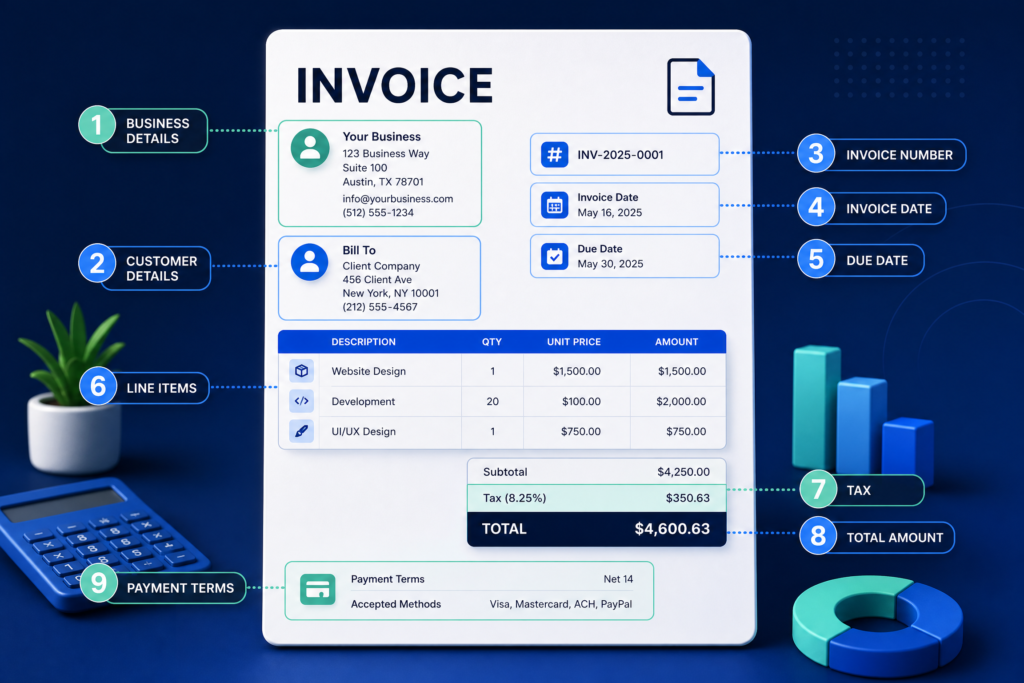
The essential invoice fields checklist
| Field | What to include | Why it matters |
| Invoice heading | The word “Invoice” or an equivalent label | Tells the recipient what the document is |
| Seller details | Legal or trading name, address, email, phone, and registration details where required | Identifies the business requesting payment |
| Customer details | Customer or company name, address, and contact information | Identifies who is responsible for payment |
| Invoice number | A unique number using a consistent numbering system | Helps both parties track the transaction |
| Invoice date | The date the invoice was issued | Establishes when the request was made |
| Supply date | The date or period when goods or services were provided | Clarifies what period the charge covers |
| Line items | Clear descriptions, quantities, rates, and amounts | Shows exactly how the total was calculated |
| Tax details | Tax or VAT rate, tax amount, and registration number when applicable | Supports compliant tax reporting |
| Total due | Subtotal, discounts, tax, fees, and final amount | Makes the payment request unambiguous |
| Payment terms | Due date, accepted methods, late-payment terms, or agreed milestones | Sets expectations for payment |
| Notes | Helpful project, delivery, thank-you, or reference information | Adds context without hiding the important numbers |
How to write an invoice step by step
Step 1: Add your business information
Start with the information that identifies you as the seller. Use the business name your customer recognizes, together with your address and a reliable contact method. If you operate as a sole trader or under a trading name, local rules may require additional information. For example, GOV.UK distinguishes between sole trader and limited-company invoice details.
Include the following where relevant:
•Business or legal name.
•Trading name, if different.
•Business address.
•Email address and telephone number.
•Website address.
•Company registration number, if applicable.
•Tax or VAT registration number, if applicable.
•Logo, if it improves recognition without making the document difficult to read.
Do not use a decorative brand name alone when the customer needs your legal name for accounting or tax records. If you are unsure which name or registration number to show, check your local rules or ask an accountant.
Step 2: Add the customer’s details
Address the invoice to the person or organization responsible for payment. For a business customer, use the company’s correct legal or billing name rather than only the name of an individual contact.
Add the customer’s name, billing address, and email address. Depending on the transaction, you may also need a delivery address, purchase-order number, customer tax number, or contact person. Ask for this information before sending the invoice so it does not have to be corrected later.
Step 3: Create a unique invoice number
Every invoice should have a unique identifier. A simple sequence such as INV-0001, INV-0002, and INV-0003 is easy to understand. Some businesses use the year or customer code, such as 2026-ACME-004.
Choose a system that you can maintain consistently. Do not reuse an old invoice number, even if the earlier invoice was cancelled. If you make a mistake, keep a record of the correction and follow the credit-note or cancellation process required in your jurisdiction.
A good invoice-numbering system should be:
•Unique for every invoice.
•Easy to search in your files.
•Consistent across customers.
•Difficult to confuse with a quote or receipt number.
•Compatible with any accounting software you use.
Step 4: Add the invoice date and supply date
The invoice date is the date you issue the document. The supply date, sometimes called the service date or tax point, is when the goods or services were supplied. These dates may be the same, but they are not always the same.
For recurring work, identify the service period, such as 1–31 August 2026. For a project milestone, write the milestone or completion date. Clear dates help the customer match the invoice to a contract, purchase order, delivery, or timesheet.
Step 5: Describe each product or service clearly
The description should allow the customer to understand what they are paying for without opening another document. Avoid vague phrases such as “work completed” or “services rendered” when a more precise description is available.
Instead of writing:
Consulting — $800
write something like:
Website conversion review and written recommendations — fixed project fee
For products, include a product name, model, size, quantity, or other identifying information. For services, include the project name, billing period, milestone, hours, deliverable, or agreed scope.
Step 6: Add quantities, rates, and line-item amounts
For each line item, show the quantity, unit price or hourly rate, and line total. The basic calculation is:
Quantity × unit price = line-item amount
For example, 8 hours at $75 per hour equals $600. If you charge a fixed project fee, you can use a quantity of 1 and describe the scope in the item description.
Do not combine unrelated work into one unexplained total. Separating design, development, travel, materials, and other charges makes the invoice easier to check and less likely to be disputed.
Step 7: Calculate the subtotal
Add all line-item amounts before tax, discounts, shipping, or other fees. The subtotal gives the customer a clear view of the underlying goods or services.
A simple invoice may show:
•Line-item amount: $600.00
•Line-item amount: $250.00
•Subtotal: $850.00
Check that the subtotal matches the line items. If you use an invoice generator, confirm that decimal rounding and quantity calculations behave as expected before sending.
Step 8: Add discounts, fees, and tax when applicable
Show discounts and additional fees separately rather than hiding them inside the item prices. This makes the final amount easier to understand.
For a 10% discount on an $850 subtotal:
•Subtotal: $850.00
•Discount: −$85.00
•Taxable amount: $765.00
If tax or VAT applies, show the correct rate and amount. Tax treatment can depend on location, customer type, product or service, exemptions, reverse-charge rules, and registration status. The European Commission lists additional invoice wording that may be needed in specific EU VAT situations, including reverse charge, exempt transactions, self-billing, and cash accounting.
Do not guess a tax rate simply because it is common in another country. If you are unsure, verify the rate with your tax authority or a qualified professional.
Step 9: Show the total amount due
Make the final amount visually prominent. A customer should not have to add several numbers to discover what to pay.
A clear total section might look like this:
| Summary | Amount |
| Subtotal | $850.00 |
| Discount | −$85.00 |
| Taxable amount | $765.00 |
| Sales tax, 8% | $61.20 |
| Total due | $826.20 |
Use the correct currency symbol or currency code, particularly when you work with international customers. When the currency could be ambiguous, show the code, such as USD, EUR, GBP, or CAD.
Step 10: Add payment terms and payment instructions
Payment terms tell the customer when and how to pay. Common examples include:
•Due upon receipt: Payment is expected when the customer receives the invoice.
•Net 7: Payment is due seven calendar days after the invoice date, unless your agreement defines it differently.
•Net 14: Payment is due within fourteen days.
•Net 30: Payment is due within thirty days.
•50% deposit, 50% on completion: Payment is split between agreed milestones.
Write the actual due date whenever possible. “Net 30” may be interpreted differently if the invoice date or receipt date is unclear.
Add the payment methods you actually accept, such as bank transfer, card payment, online payment link, or check. For a bank transfer, verify the account details carefully. If you provide bank information, use the correct business account and be cautious when changing payment instructions because invoice fraud often relies on altered bank details.
Step 11: Add notes without hiding important information
A short note can make the invoice more helpful. You could include a thank-you message, project reference, delivery information, late-payment wording, or a reminder to include the invoice number with payment.
Keep legal, tax, and payment information clear. Do not put the due date or total only inside a long paragraph at the bottom of the page.
Step 12: Review, export, and send the invoice
Before sending, check the customer name, invoice number, dates, quantities, rates, tax, total, payment details, and attachment. Review the exported PDF on both desktop and mobile if possible.
The InvoiceExact free invoice generator can help you create, preview, and download an invoice. For a blank layout or inspiration, browse the InvoiceExact invoice templates.
Send the invoice to the agreed billing email or portal. Use a professional filename such as Invoice-INV-0007-Acme-Corporation.pdf, not final-final-new.pdf.
Invoice example for a freelancer
Here is a simple service invoice example for a freelance designer.
Brightline Design
18 Market Street, Bristol BS1 4AA
hello@brightlinedesign.example
INVOICE: INV-2026-0042
Invoice date: September 2, 2026
Due date: October 2, 2026
Bill to:
Northstar Studio Ltd.
55 King Road
Bristol BS2 8XY
| Description | Quantity | Rate | Amount |
| Brand identity concept and direction | 1 | £900.00 | £900.00 |
| Presentation template design | 1 | £450.00 | £450.00 |
| Subtotal | £1,350.00 | ||
| VAT, if applicable | £270.00 | ||
| Total due | £1,620.00 |
Payment terms: Payment due within 30 days. Please include INV-2026-0042 with your payment reference.
Note: Thank you for working with Brightline Design.
This example is intentionally simple. The correct VAT treatment, registration number, and wording depend on the freelancer’s tax status and location.
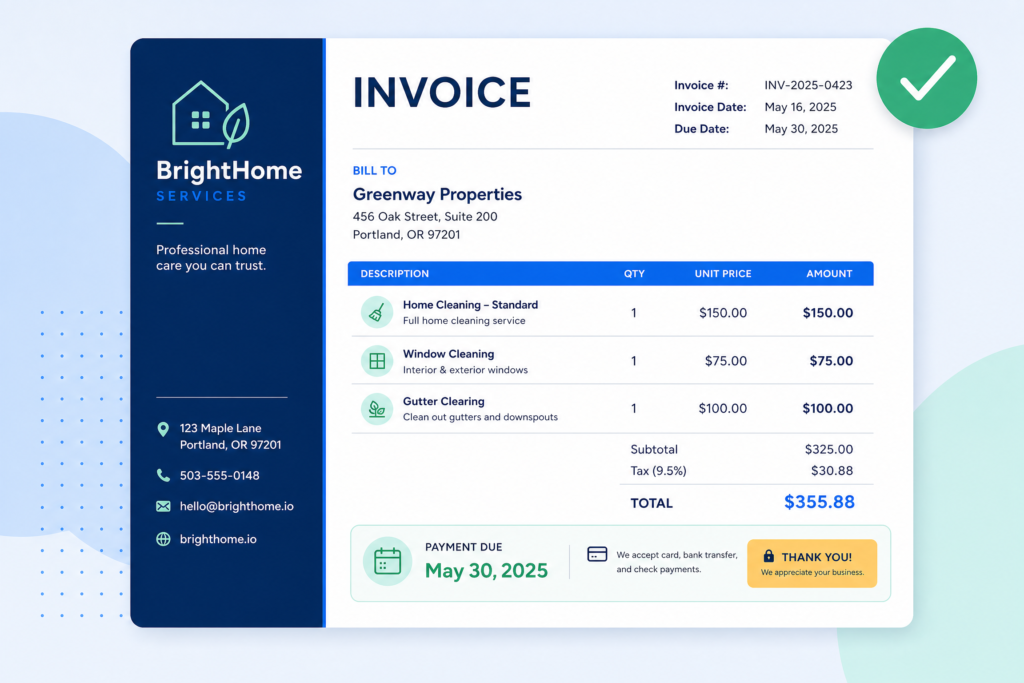
Invoice example for a service business
Imagine a cleaning company billing a property manager. The invoice could list each service separately so the customer can compare the charges with the agreed scope.
| Description | Quantity | Rate | Amount |
| Standard home cleaning | 2 visits | $150.00 | $300.00 |
| Window cleaning | 1 service | $95.00 | $95.00 |
| Supply and materials fee | 1 | $25.00 | $25.00 |
| Subtotal | $420.00 | ||
| Local tax, if applicable | $33.60 | ||
| Total due | $453.60 |
A description such as “cleaning services” may be enough for a very small charge, but a breakdown is more useful when several visits, locations, or service types are involved.
Invoice example for products
Product invoices usually need more detail about quantities and the goods supplied. Include product names, stock-keeping units or model numbers when useful, unit prices, quantities, shipping, and any applicable tax.
| Product | SKU | Quantity | Unit price | Amount |
| A4 recycled notebooks | NB-A4 | 20 | $6.50 | $130.00 |
| Blue gel pen pack | PEN-BLUE | 10 | $4.00 | $40.00 |
| Shipping | 1 | $12.00 | $12.00 | |
| Subtotal | $182.00 |
If you sell across borders, additional customs, import, export, or tax information may be needed. An ordinary domestic invoice is not automatically sufficient for an international shipment.
Invoice example for a small business with a deposit
For larger projects, your contract may divide payment into milestones. Your invoice should state which milestone it covers and show how the deposit affects the remaining balance.
Project: Website redesign
Contract value: $4,000.00
This invoice: 50% project deposit
| Description | Amount |
| Website redesign deposit, 50% of agreed project fee | $2,000.00 |
| Tax, if applicable | $0.00 |
| Total due | $2,000.00 |
The invoice should not imply that the full $4,000 is currently due if the agreement calls for staged billing. Clear milestone language helps the customer understand the balance.
Common invoice mistakes to avoid
Using an unclear description
A customer should be able to connect each line item to a product, service, project, purchase order, or agreement. Vague descriptions create unnecessary questions and can delay payment.
Forgetting the due date
“Please pay soon” is not a payment term. Include a due date or a clear rule such as “due within 14 days of the invoice date.”
Reusing invoice numbers
Duplicate numbers can make your records difficult to reconcile. Use one sequence and record cancelled or corrected invoices.
Mixing currencies
Do not show a dollar symbol without clarifying which dollar currency applies when the customer is international. Use a currency code when necessary.
Applying the wrong tax treatment
Tax rules vary widely. The invoice generator can calculate the number you enter, but it cannot determine whether your business should charge tax, which tax applies, or whether an exemption is valid.
Sending an unreviewed PDF
Always open the exported file. Check page breaks, logos, signatures, long descriptions, decimal rounding, and the final total. A preview that looks correct in a browser can still export differently.
Adding unnecessary personal or bank information
Include what the customer needs to identify the transaction and pay you. Avoid placing sensitive personal details in an invoice unless there is a legitimate business reason and appropriate protection.
Hiding payment instructions
Make the accepted payment methods and due date easy to find. A customer should not have to search through a paragraph or email thread.
How to send an invoice professionally
Use the customer’s preferred channel. Some businesses require invoices to be submitted through a portal, while others accept email attachments. If you send an email, use a clear subject such as:
Invoice INV-2026-0042 from Brightline Design — due October 2, 2026
Keep the message short. Mention the project or service period, the total due, the due date, and the attached file. If payment instructions have changed, confirm the change through a trusted channel rather than relying only on a new email address.
For recurring customers, use a consistent filename and email structure. Save a copy of the invoice and any related purchase order, delivery record, contract, or payment confirmation. The IRS lists invoices and receipts among supporting documents for business records, although recordkeeping periods and tax rules vary by jurisdiction.
What to do if an invoice is overdue
An overdue invoice does not always mean the customer refuses to pay. The message may have gone to the wrong person, the purchase order may be missing, or the customer may have a question about one line item.
Use a calm sequence:
1.Send a friendly reminder before or shortly after the due date.
2.Include the invoice number, amount, original due date, and payment link or instructions.
3.Ask whether the customer needs any clarification or a corrected document.
4.Follow the late-payment terms in your agreement.
5.Keep written records of reminders and responses.
A simple reminder could say:
Hello [Name], I am following up on invoice [number] for [amount], which was due on [date]. I have attached the invoice again for convenience. Please let me know if you need any information from me to process payment. Thank you.
Do not add a late fee unless it was agreed or is allowed under the rules that apply to your transaction.
Invoices, quotes, receipts, and calculators from InvoiceExact
InvoiceExact is designed for the practical sequence that many freelancers and small businesses follow:
1.Calculate: Work out pricing, tax, percentages, discounts, or margins with a business calculator.
2.Quote: Present the proposed scope and price before the customer approves the work.
3.Invoice: Request payment for the agreed goods or services.
4.Receipt: Confirm payment after the customer has paid.
Start with the free invoice generator, compare layouts in the invoice template library, or explore the InvoiceExact homepage for other free tools. When a customer has paid, create a confirmation with the free receipt generator.
Frequently asked questions
Can I write an invoice without a company?
In many places, sole traders, freelancers, and independent professionals can invoice customers using their own name or a registered trading name. The exact information required depends on local business and tax rules. Include accurate seller details and check whether your location requires registration or specific wording.
Can I create an invoice in Word or Google Docs?
Yes. A document editor can work for occasional invoices if the layout includes the required information and the calculations are correct. A dedicated invoice generator can reduce repetitive formatting and make totals easier to review. Whichever method you use, save a copy and keep your invoice numbers consistent.
Is an invoice the same as a bill?
In everyday business language, “invoice” and “bill” often refer to the same request for payment. “Invoice” is more common in formal business documents. The important point is that the document clearly identifies the transaction, amount due, and payment terms.
Does an invoice need a signature?
Many ordinary invoices do not require a signature, but a contract, customer, industry, or local rule may require one. A signature can also be useful when the invoice confirms approval or completion. Check the customer’s requirements before sending.
Should I include my bank details on an invoice?
Include payment instructions that customers need to pay you, but protect sensitive information and verify the account details. For bank transfers, show the correct business account information and be cautious about changes communicated by email.
How long should I keep invoices?
There is no single worldwide retention period. Keep invoices and related records for the period required by your tax, company, and accounting rules. The IRS explains that supporting documents can substantiate business income and deductions, but US recordkeeping rules should not be applied automatically to businesses elsewhere.
Can an invoice be corrected after it is sent?
If the original invoice contains an error, do not silently change the copy already sent. Depending on the error and local rules, you may issue a corrected invoice, credit note, debit note, or replacement document that clearly references the original invoice.
How do I write an invoice for international customers?
Use the customer’s legal details, state the currency clearly, confirm tax treatment, and include any required VAT, registration, customs, or reverse-charge information. International invoicing can involve rules from more than one country, so get professional advice when the transaction is significant or complex.
Printable invoice checklist
Before you send an invoice, confirm that:
•The document is clearly labelled “Invoice.”
•Your business or legal details are correct.
•The customer’s billing details are correct.
•The invoice number is unique.
•The invoice date is present.
•The supply date or service period is clear.
•Every line item has a useful description.
•Quantities, rates, and amounts are correct.
•Discounts, fees, shipping, and tax are shown separately where appropriate.
•The final total and currency are clear.
•The due date is visible.
•Payment instructions are accurate.
•The PDF opens correctly and has no unwanted blank pages.
•The filename includes the invoice number and customer name.
•You saved a copy for your business records.
Final thoughts
The best invoice is not the most complicated one. It is the one that gives the customer enough information to understand the charge, approve the amount, and pay without unnecessary back-and-forth.
Use a consistent invoice number, write specific descriptions, show the calculation clearly, state the due date, and review the exported document before sending it. For a faster starting point, create your document with the InvoiceExact free invoice generator, then use the free receipt generator when payment arrives.
InvoiceExact provides document-generation and calculation tools, not tax, legal, accounting, or financial advice. Verify local requirements with the relevant authority or a qualified professional.
References
[1] GOV.UK — Invoices: what they must include

Leave a Reply